
SMS Messaging Policy
Grocer is a shared grocery-list app for iOS, provided by Narro. This page describes every text message Grocer sends, and the single way a phone number can ever reach us. It is published for our customers and for messaging-campaign review.
Last updated July 28, 2026
The whole program, in one line
You text us a one-time code from inside the Grocer app to sign in. We reply once to confirm it worked. That is all — no marketing, no recurring texts, and never a message to someone who has not just messaged us.
- Messages we send
- One per sign-in you start
- Message frequency
- Only when you sign in
- Our number
- +1 (239) 518-4176
How you opt in
There is one opt-in path and no others: you message us first. Consent is the act of sending that message from your own device.
The consumer opens Grocer and reaches the sign-in screen
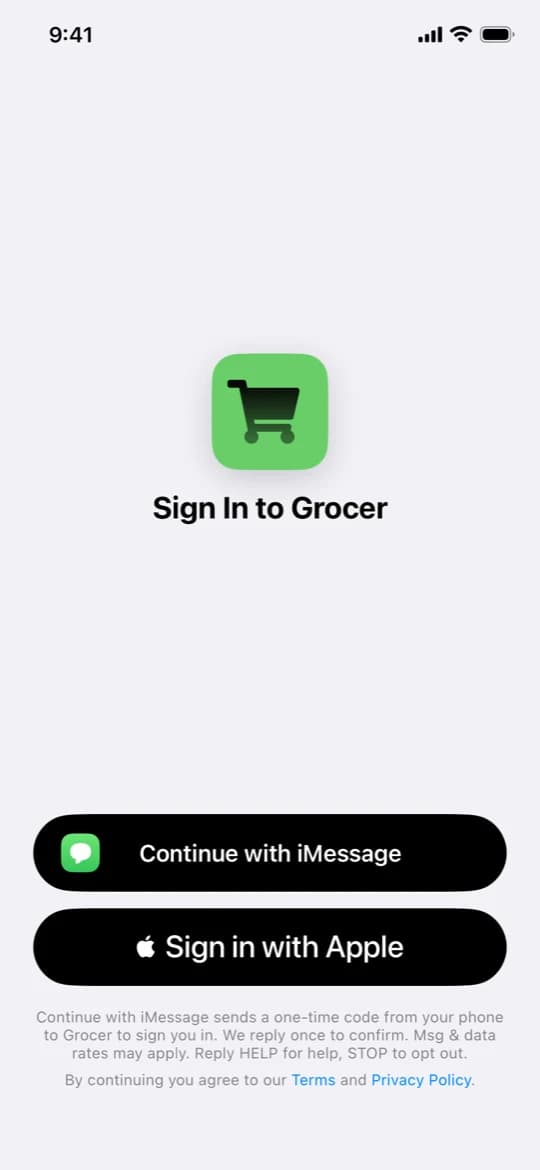
Grocer is an iOS app currently awaiting App Store review. The screen pictured below is shown whenever the app has no signed-in account. Phone sign-in is one of two options on it; Sign in with Apple sits directly beneath and does the same job with no messaging at all.
The screen states what will happen, before anything is tapped
The disclosure below is displayed on the sign-in screen itself, directly under the buttons, with Terms and Privacy Policy as tappable links. Nothing is pre-checked, pre-selected, or consented to by default.
The consumer taps “Continue with iMessage”
This is a deliberate action the consumer has to take. Tapping it does not send anything — it opens the composer in step 4.
The iPhone’s own Messages app opens, pre-filled
Grocer opens the native Messages composer addressed to +1 (239) 518-4176 with the body
sign me in with code 3WMPQ8(the code changes each attempt). The consumer reads it and taps Send themselves. The app has no ability to send this message on their behalf and never attempts to. Dismissing the composer without sending cancels the sign-in, and no message is ever exchanged.That message is the opt-in — we reply once
Receiving that text is the only way a number can enter this program. We match the one-time code to the pending sign-in and reply a single time to confirm, then send nothing further. We never message a number that has not just messaged us.
“Continue with iMessage sends a one-time code from your phone to Grocer to sign you in. We reply once to confirm. Msg & data rates may apply. Reply HELP for help, STOP to opt out. By continuing you agree to our Terms and Privacy Policy.”
What we send back
One message per sign-in. The first time you ever sign in, that same message carries a contact card so you can save Grocer and recognize the number next time; after that you get the confirmation alone.
Every sign-in after your first
Grocer: verified! Return to the app to continue. Msg&data rates may apply. Reply HELP for help, STOP to opt out.
Your first sign-in (includes a contact card)
Grocer: verified! Return to the app to continue. Save our contact so you recognize this number next time. Msg&data rates may apply. Reply HELP for help, STOP to opt out.
Rates, help, and opting out
Message and data rates may apply. Grocer does not charge for messages, but your carrier may.
Reply STOP to any message from +1 (239) 518-4176 to opt out. You will receive one confirmation that you have been unsubscribed, and nothing after that. Reply START to opt back in, or HELP for help. Opting out does not delete your Grocer account — it does mean phone sign-in stops working for you, so use Sign in with Apple instead.
For anything else, email human@grocer.sh and a human will get back to you.
What we never do
- We never send the first message. There is no endpoint in our system that can text a number of anyone’s choosing.
- No marketing, promotional, or re-engagement messages — ever, to anyone.
- No recurring messages. Volume is one reply per consumer-initiated sign-in.
- No web forms, paper forms, purchased lists, lead generators, or affiliates. There is no other way to give us a number.
- No sharing of mobile numbers with third parties or affiliates for marketing or promotional purposes.
How your number is stored and used is covered in our Privacy Policy, and the rest of the agreement is in our Terms of Use.